> For the complete documentation index, see [llms.txt](https://relationlabs.gitbook.io/protocol/llms.txt). Markdown versions of documentation pages are available by appending `.md` to page URLs; this page is available as [Markdown](https://relationlabs.gitbook.io/protocol/schema-standard/overview.md).
# Overview
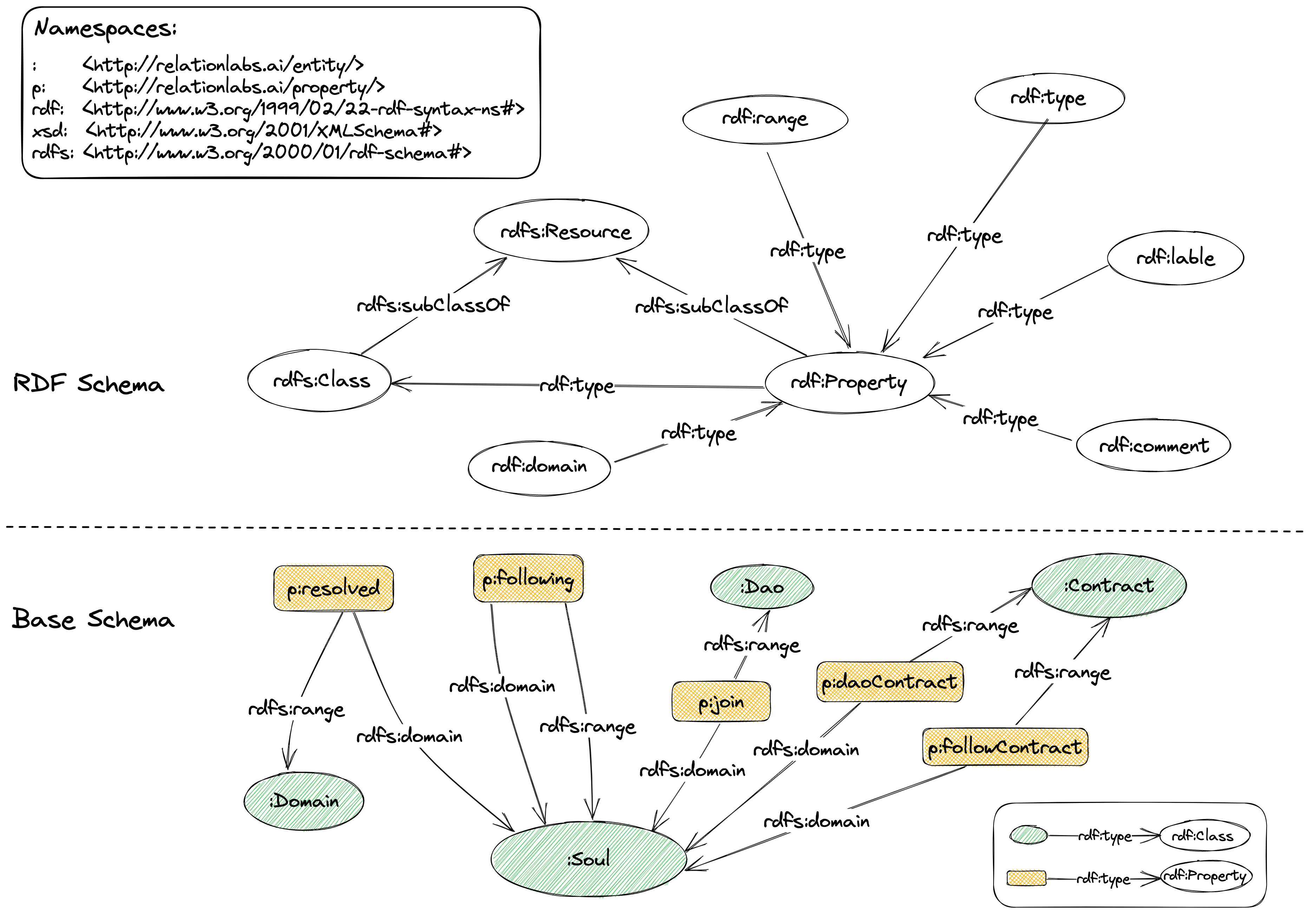
Schema Standard is for storing social data in the Relation Protocol. It requires that all social data based on the Relation protocol should conform to the following:
* RDF Schema
* Base Schema
Figure 4-1 Schema Standard
***
### RDF Schema
RDF Schema (RDFS) is a metadata language to describe an RDF graph. It is also called an RDF Vocabulary. It offers a set of terminologies and relationships to define and describe the basic structure and constraints of an RDF data.
> The main purpose of RDFS is to provide a way to describe classes, properties, and the relations between them in an RDF data model. By defining the layer, domain, range, and metadata of these RDFS classes and properties, we can provide more meaning and semantics for an RDF graph.
The fact that RDFS uses the RDF format means it can be integrated with other RDF data to expand its semantics. For example, we can use RDFS to define ontologies to describe concepts and relations in certain areas and integrate them with other RDF ontologies to create a more sophisticated knowledge graph.
Based on the schema standard provided by W3C, the Relation Protocol defines the schema needed to build a social graph as the Schema Standard.
## Base Schema
Base Schema is a Schema definition that the deployment of a contract on Relation Protocol should refer to ([The list of Base Schema](/protocol/schema-standard/schema-list.md)). It defines the most basic specification for social data in the Relation Protocol. All RDFs data should be constructed according to the definition defined by the Base Schema.
Base Schema consists of several TTL files stored in Arweave. It is managed and updated by the Relation DAO.
For example, the contents of [`Follow Schema`](https://arweave.net/-2hCuTMqo1fz2iyzf7dbEbzoyceod5KFOyGGqNiEQWY) blow:
```
PREFIX :
PREFIX p:
PREFIX rdf:
PREFIX xsd:
PREFIX rdfs:
###################
# class
###################
:Soul a rdfs:Class ;
rdfs:label "soul" ;
rdfs:comment "A soul" .
###################
# predicate
###################
p:following a rdf:Property ;
rdfs:comment "Following a soul" ;
rdfs:domain :Soul ;
rdfs:range :Soul .
```
It defines a Class: `Soul`, which can be used as a subject and an object; a Property: `following`, which can be used as a predicate.
The social data generated according to the above Schema is as follows:
```
:Soul_0x0109c8ee3151bde7b6b5d9f37e9d2c4bc16930fe a :Soul .
:Soul_0x6247123ec0fe0d25feb811e3c4d4a760c1f2e63e a :Soul .
:Soul_0x0109c8ee3151bde7b6b5d9f37e9d2c4bc16930fe p:following :Soul_0x6247123ec0fe0d25feb811e3c4d4a760c1f2e63e .
```