> For the complete documentation index, see [llms.txt](https://relationlabs.gitbook.io/protocol/llms.txt). Markdown versions of documentation pages are available by appending `.md` to page URLs; this page is available as [Markdown](https://relationlabs.gitbook.io/protocol/protocol-zh/schema-standard/overview.md).
# 概述
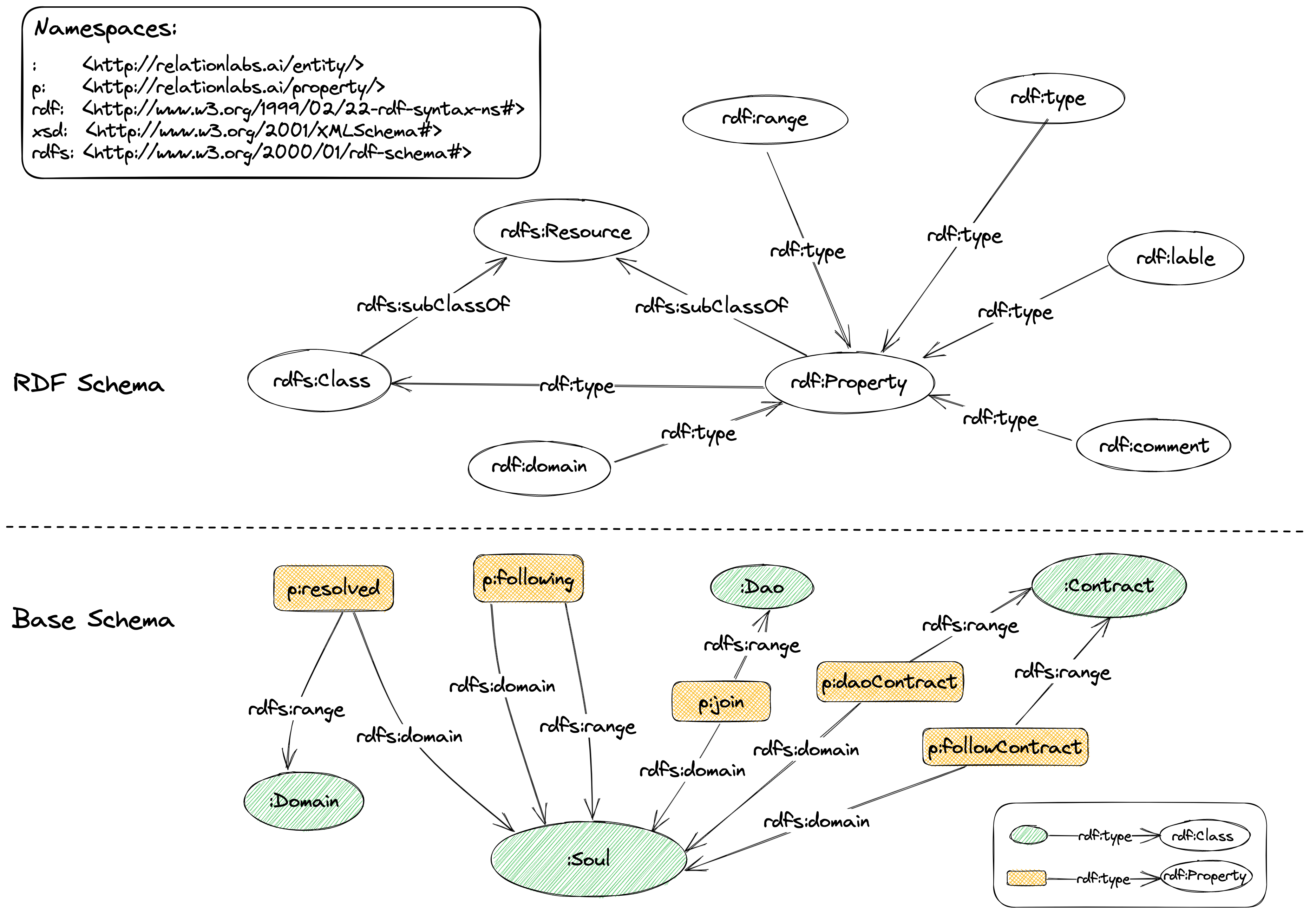
Schema Standard 是Relation Protocol中的社交数据存储的Schema标准,它约定了所有基于Relation protocol构建的社交数据格式必须要符合:
* RDF Schema
* Base Schema
图 4-1 Schema Standard
***
## RDF Schema
RDF Schema (RDFS)是一种用于描述RDF图结构的元数据语言,也称为RDF词汇表。它提供了一组术语和关系,用于定义和描述RDF数据的基本结构和约束。
> RDFS的主要目的是提供一种方法来描述RDF数据模型中的类别和属性,以及它们之间的关系。通过定义RDFS类别(class)和属性(property)的层次结构、域(domain)和范围(range)以及其他元数据信息,可以为RDF图提供更多的含义和语义。
RDFS使用RDF格式表示,因此可以与其他RDF数据集成,以扩展其语义。例如,可以使用RDFS定义本体,以描述领域特定的概念和关系,并将其与其他RDF本体集成,以创建更丰富的知识图谱。
Relation Protocol在W3C提供的schema基础上,定义了构建社交图谱需要的schema,作为Schema Standard。
## Base Schema
Base Schema是Relation Protocol合约部署时所需要参照的Schema定义([Base Schema列表](/protocol/protocol-zh/schema-standard/schema-list.md)),其中约定了Relation Protocol最基础的社交数据规范,所有RDF的构建都需要符合Base Schema的数据定义。
Base Schema由若干个存储在Arweave上的TTL文件组成,它由Relation DAO管理和更新。
例如, 下面是[`Follow Schema`](https://arweave.net/-2hCuTMqo1fz2iyzf7dbEbzoyceod5KFOyGGqNiEQWY):
```
PREFIX :
PREFIX p:
PREFIX rdf:
PREFIX xsd:
PREFIX rdfs:
###################
# class
###################
:Soul a rdfs:Class ;
rdfs:label "soul" ;
rdfs:comment "A soul" .
###################
# predicate
###################
p:following a rdf:Property ;
rdfs:comment "Following a soul" ;
rdfs:domain :Soul ;
rdfs:range :Soul .
```
其中定义了一个Class: `Soul`,可以作为主语和宾语;一个Property:`following`可,可以作为谓语。
根据上面Schema产生的社交数据如下:
```
:Soul_0x0109c8ee3151bde7b6b5d9f37e9d2c4bc16930fe a :Soul .
:Soul_0x6247123ec0fe0d25feb811e3c4d4a760c1f2e63e a :Soul .
:Soul_0x0109c8ee3151bde7b6b5d9f37e9d2c4bc16930fe p:following :Soul_0x6247123ec0fe0d25feb811e3c4d4a760c1f2e63e .
```