> For the complete documentation index, see [llms.txt](https://relationlabs.gitbook.io/protocol/llms.txt). Markdown versions of documentation pages are available by appending `.md` to page URLs; this page is available as [Markdown](https://relationlabs.gitbook.io/protocol/protocol-zh/contract-open-standard/identity/name-service.md).
# Name Service
在web3系统中,地址通常作为用户的身份标识。然而地址的可读性比较差,拿以太坊上的地址为例,一串16进制的数字,长度为40。不便于作为社交应用的身份展示。
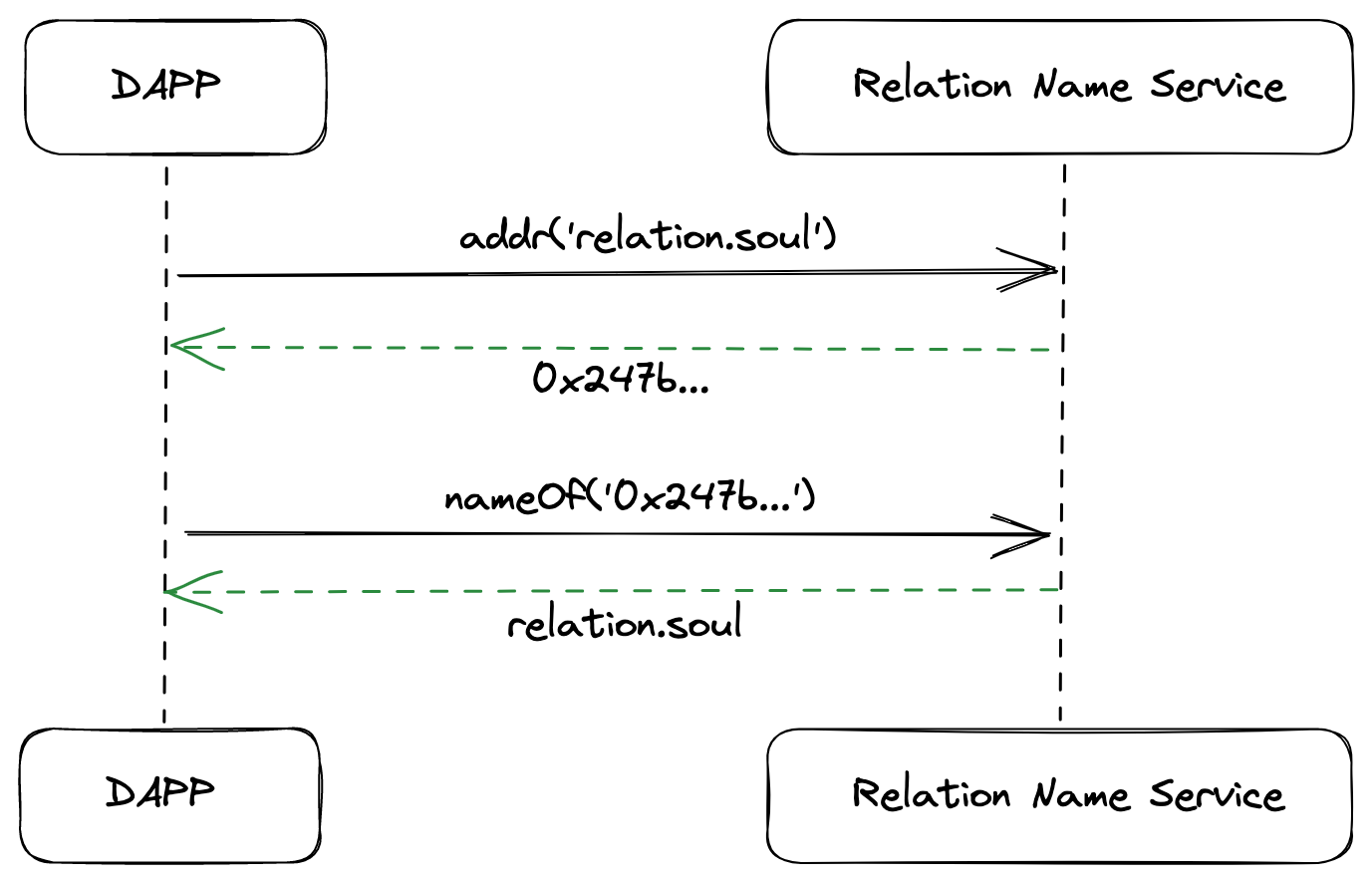
为此,我们提供一个Relation Name Service合约,将可读名称(比如 "relation.soul")解析为计算机可以识别的表示符。
图 5-2 Name Service 数据流
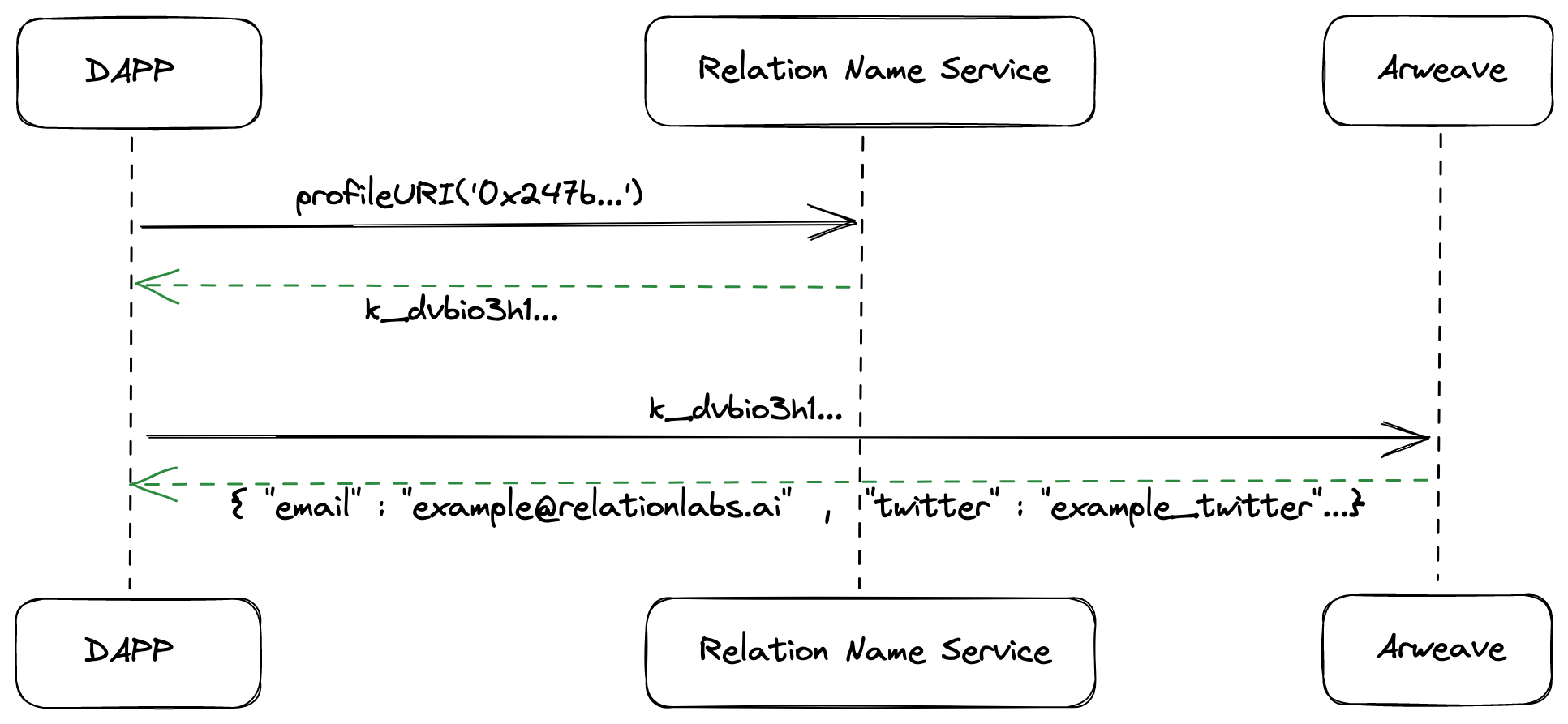
图 5-3 Profile 数据流
PREFIX xsd:
PREFIX rdfs:
```
* class
```
:Soul a rdfs:Class ;
rdfs:label "Soul" ;
rdfs:comment "A soul." .
:Name a rdfs:Class ;
rdfs:label "Name" ;
rdfs:comment "A name." .
```
:Soul表示接受和绑定域名解析的地址;
:Domain用于表示域名
* predicate
```
p:hold a rdf:Property ;
rdfs:label "hold" ;
rdfs:comment "A Soul to own a name." ;
rdfs:domain :Soul ;
rdfs:range :Name .
p:resolved a rdf:Property ;
rdfs:label "resolved" ;
rdfs:comment "The resolved name of a soul." ;
rdfs:domain :Soul ;
rdfs:range :Name .
p:profileURI a rdf:Property ;
rdfs:label "profileURI" ;
rdfs:comment "The profileURI of a soul." ;
rdfs:domain :Soul ;
rdfs:range xsd:string .
```
p:hold表示地址持有域名,并未解析
p:resolved表示地址已经与域名建立联系,可通过域名解析出地址。
p:profileURI 表示用户的profileURI
## 合约
### 合约接口
Name Service的合约接口如下:
```solidity
interface INameService is ISemanticSBT {
/**
* 注册一个域名
* @param owner 域名的owner
* @param name 需要注册的域名
* @param reverseRecord 是否设置解析记录
* @returns tokenId
*/
function register(address owner, string calldata name, bool reverseRecord) external returns (uint);
/**
* 设置解析记录,将域名跟地址建立关系
* @param addr 域名的owner,如果owner为0地址,则认为是解绑关系
* @param name 域名
*/
function setNameForAddr(address addr, string calldata name) external;
/**
* 给调用者设置profileURI
* @param profileURI arweave的交易哈希
*/
function setProfileURI(string memory profileURI) external;
/**
* 解析域名
* @param name 域名
* @return addr 地址
*/
function addr(string calldata name) virtual external view returns (address);
/**
* 反向解析
* @param addr 地址
* @return name 域名
*/
function nameOf(address addr) external view returns (string memory);
/**
* 查询地址的profileURI
* @param addr 地址
* @return profileURI arweave的交易哈希
*/
function profileURI(address addr) external view returns (string memory);
}
```
完整的合约代码可访问:
* [NameService](https://github.com/relationlabs/semanticSBT/blob/main/contracts/template/NameService.sol)
### 合约实现说明
我们对Name Service做了一些规则设置:
* 域名默认最小长度为3个字符
* 域名只有设置解析之后,才能被合约正确解析。设置解析有两个方式:
* register时即设置解析
* register之后,调用setNameForAddr设置解析
* 如果当前域名已经设置了解析,需要先解绑原地址,才能重新设置
* 合约默认transfer开关关闭,即所有token不能transfer。如果需要打开,可以调用setTransferable方法进行设置
* 只有没设置解析的token才能被transfer